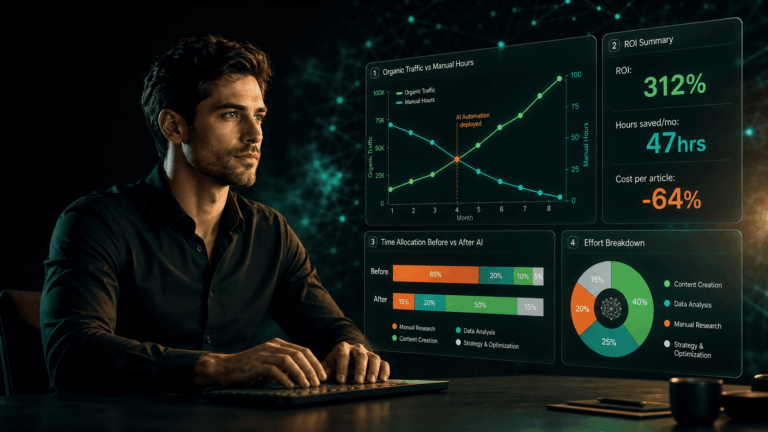

Quick answer: An AI-assisted SEO reporting system is an automated pipeline that pulls performance data from Google Search Console, rank trackers, and analytics platforms on a defined schedule, formats it consistently, adds AI-generated commentary that interprets the data and surfaces action items, and delivers the completed report to the team without anyone manually pulling numbers or writing summaries. The result is a reporting workflow that takes zero practitioner time to run and produces better analysis than most manually-assembled reports.
Affiliate disclosure: Some links in this article are affiliate links. If you purchase through them, AEO Insider earns a commission at no extra cost to you. We only recommend tools we’ve evaluated against the criteria in this guide.
SEO reporting has a fundamental problem: the people who most need the data are rarely the people assembling the report. In most teams, the SEO practitioner spends 2–4 hours per week pulling numbers from multiple dashboards, pasting them into a spreadsheet, writing a summary, and formatting a report — time that could be spent acting on the data rather than assembling it. The report arrives late, covers the wrong time window, or gets skipped entirely during busy publishing weeks.
Automation solves the assembly problem. An automated reporting pipeline runs on a schedule, pulls from the same data sources every time, and delivers a consistently formatted report without any practitioner involvement in the production process. Adding an AI summarisation layer on top of that pipeline solves the interpretation problem — instead of delivering a table of numbers that someone has to read and interpret, the system delivers a table of numbers accompanied by a written summary that identifies the most important movements and suggests what to do about them.
This guide covers how to build both layers: the automated data pipeline and the AI commentary layer that turns data into decisions. For the automation platform context these pipelines run on, see the marketing automation stack guide.
What Is an AI-Assisted SEO Reporting System?
An AI-assisted SEO reporting system combines three components: an automated data collection pipeline, a structured reporting template, and an AI commentary layer that interprets the collected data and produces written analysis alongside the numbers.
The data collection pipeline uses workflow automation tools — Make, Zapier, or n8n — to query APIs from Google Search Console, rank tracking platforms, and analytics tools on a defined schedule. The raw data is written to a Google Sheet or database in a consistent format. A Looker Studio dashboard reads from that Sheet and visualises the data automatically — so the dashboard updates without anyone opening it or refreshing it manually.
The AI commentary layer is a second automation that runs after the data collection pipeline. It reads the current week’s data from the Google Sheet, compares it to the previous week’s and previous month’s data, and sends the delta figures to the Claude or GPT-4o API with a structured analysis prompt. The API returns a written summary — identifying the biggest positive and negative movements, connecting them to recent publishing activity where the timing suggests a relationship, and flagging the two or three actions with the highest expected impact in the coming week. This summary is appended to the report and delivered via Slack or email alongside the dashboard link.
The complete system runs unattended, produces a consistent report every week at the same time, and requires practitioner involvement only when the summary flags something that needs a decision. Most weeks, the report is read in five minutes and filed. The weeks where it flags a significant rank movement or traffic anomaly are the weeks it earns its infrastructure cost.
Which Data Sources Does an AI SEO Report Need to Pull From?
A complete AI SEO reporting system draws from five data source categories. Each covers a distinct performance layer — removing any one creates blind spots that manual review cannot reliably compensate for.
| Data Source | What It Provides | API / Integration | Report frequency |
|---|---|---|---|
| Google Search Console | Clicks, impressions, CTR, average position by query and page; AI Overview impressions; index coverage status | GSC API (free) | Weekly |
| Rank tracking platform | Keyword-level position tracking with daily granularity; SERP feature presence; AI Overview appearance tracking | Semrush API, SE Ranking API, or Ahrefs API | Daily alerts, weekly digest |
| GA4 / Analytics | Sessions, engagement rate, conversions by channel; AI referral traffic (perplexity.ai, chatgpt.com, gemini.google.com) | GA4 Data API (free) | Weekly |
| Content publishing log | Articles published in the reporting period with publish date, category, and target keyword | WordPress REST API or manual Google Sheet | Weekly |
| Backlink monitoring | New and lost backlinks in the reporting period; referring domain changes; domain authority trend | Ahrefs API or Semrush API | Weekly |
For a lean reporting system on a content site in its first 12 months, prioritise Google Search Console, GA4, and the content publishing log. These three sources answer the core questions — what is ranking and getting clicked, where is traffic coming from, and what did we publish — without requiring paid API subscriptions. Add rank tracking data once you are monitoring more than 50 keywords and need daily granularity beyond what GSC provides. Add backlink monitoring once link acquisition is an active part of the strategy.
The reporting stack on client accounts here has evolved from the original GA4 + Google Ads to Sheets to PDF build into a GA4 + GSC to BigQuery to Looker Studio pipeline, with a custom channel group that filters AI referral sources — chatgpt.com, perplexity.ai, gemini.google.com — as their own dedicated segment. Looker Studio is live across three client accounts; the AI commentary via Claude API fires on the weekly Slack digest for aeoinsider.com but not yet on client-facing reports. One honest caveat: the standard Looker Studio GSC connector misses AI Overview impression granularity at the level needed for citation monitoring — which is why the BigQuery export layer matters. The exact field names for AI Overview impression data in the BigQuery GSC export are not yet publicly confirmed, so that specific data point still requires manual verification alongside the automated pipeline.
How Do You Build an Automated SEO Reporting Pipeline?
The reporting pipeline has four stages: data collection, data storage, visualisation, and delivery. Each stage can be implemented with free or low-cost tools and built sequentially — the first stage delivers value immediately, and each subsequent stage adds capability without requiring the previous stage to be rebuilt.
- Stage 1 — Data collection (Make + APIs). Create a Make scenario scheduled to run every Monday morning at 6am. Add modules to query the Google Search Console API for the past seven days of search performance data (queries, clicks, impressions, position) and the GA4 Data API for sessions by channel and AI referral sources. For each API call, map the returned fields to a consistent output format — you will write this data to Google Sheets in the next stage, so the field names here become column headers there. Authenticate using Google service account credentials for GSC and a GA4 API key for analytics.
- Stage 2 — Data storage (Google Sheets). Create a Google Sheet with a tab per data source: “GSC Weekly,” “GA4 Weekly,” “Content Log,” and a “Summary” tab that aggregates key metrics from the other tabs using formula references. Each week’s data collection appends a new dated row to the relevant tab. This cumulative structure means the sheet builds a historical record automatically — by week 12, you have three months of trend data without any additional setup. Keep the raw data tabs unchanged and build all derived metrics in the Summary tab so the source data stays clean.
- Stage 3 — Visualisation (Looker Studio). Connect Looker Studio to the Google Sheet. Build a one-page dashboard with: a seven-day vs prior period clicks and impressions comparison, a top ten queries by clicks table, a top ten pages by clicks table, a channel breakdown chart showing organic vs AI referral traffic trend, and a content publishing activity timeline. Set the dashboard to auto-refresh on the Google Sheet data connection. Once built, the dashboard updates automatically every time the Make pipeline writes new data to the Sheet — no manual refresh required.
- Stage 4 — Delivery (Make + Slack). Add a final module to the Make scenario that posts a Slack message to the SEO team channel when the pipeline completes. The message includes: week-over-week click change (percentage), total impressions, top three queries by clicks, number of articles published in the period, and a direct link to the Looker Studio dashboard. This delivery step means the team sees the weekly headline numbers in Slack without having to remember to open the dashboard — the report comes to them rather than waiting to be retrieved.
Total build time for this four-stage pipeline: 6–10 hours including API setup, Looker Studio dashboard design, and testing. Ongoing maintenance: approximately 30 minutes per month to verify the pipeline ran correctly, check for API authentication issues, and update the dashboard if reporting priorities change. The pipeline pays back its build time in practitioner hours saved within the first month of operation.
What Should a Weekly SEO Performance Report Include?
A weekly SEO performance report has three sections: performance summary, content activity, and action items. Each section answers a different question. Performance summary answers “what happened.” Content activity answers “why it happened.” Action items answers “what we do next.”
| Section | Metrics to Include | Context to Add |
|---|---|---|
| Performance summary | Total clicks (WoW change); total impressions (WoW change); average position (WoW change); AI referral sessions (WoW change); top five queries by clicks; top five pages by clicks | Flag any metric with more than 10% WoW movement for attention; note whether the change is consistent with a seasonal pattern or appears anomalous |
| AI citation visibility | Number of queries triggering AI Overviews where the site appears; changes from prior week; new AI Overview appearances for target keywords | Connect citation appearances to recently published or refreshed content where the timing suggests a relationship |
| Content activity | Articles published in the period (title, URL, target keyword); articles with significant rank movement in the period | Identify any published articles that have already begun generating impressions; flag articles from prior periods that are gaining or losing rank |
| Action items | Maximum three specific, prioritised recommendations derived from this week’s data | Each action item should be specific enough to assign: “Refresh [article URL] — lost 8 positions for [keyword] — add answer block and update statistics section” |
The action items section is the most important part of the report and the section most often omitted from manually-assembled reports. Without action items, a report is a status update. With action items, it is a decision document. The AI commentary layer described in the next section generates these action items automatically — which is why the AI layer makes the reporting system significantly more valuable than automated data delivery alone.
How Do You Add AI Summarisation to Your SEO Reports?
The AI summarisation layer is a second Make scenario that runs after the data collection pipeline has written the week’s data to Google Sheets. It reads the current week’s summary data, constructs a structured analysis prompt, sends it to the Claude API, and posts the returned commentary to Slack alongside the dashboard link.
The prompt structure for the AI commentary module is: “You are an SEO analyst reviewing weekly performance data for a content site. Based on the data provided, write a three-section performance commentary: (1) Key movements — identify the two or three most significant positive and negative changes and their likely causes; (2) Citation visibility — note any changes in AI Overview appearances and connect them to recent content activity where the timing is consistent; (3) Priority actions — recommend exactly three specific actions for this week, each referencing a specific page or keyword from the data. Write in direct, practitioner-first language. No preamble. No conclusion. Maximum 250 words total.”
The data block appended to this prompt should include: current week vs prior week figures for all core metrics, the top ten queries by click delta (largest gainers and losers), the list of articles published in the past seven days, and any rank movements greater than five positions. This context block is typically 300–500 words of structured data — well within the input capacity of current frontier models.
The returned commentary is not a replacement for practitioner judgment — it is a first-pass interpretation that the SEO lead reviews in 60 seconds. The AI identifies patterns in the data that a human would catch in a thorough manual review, but that a hurried Monday morning scan might miss. The value is not that the AI makes better decisions than the practitioner; it is that the AI ensures the data is consistently analysed at depth every single week, regardless of how busy the team is.
The first version of the Claude API commentary on the aeoinsider.com weekly Slack digest was technically correct and practically useless — Claude hedged everything with “this may suggest” and “it’s possible that,” producing analysis that was accurate in its uncertainty and worthless as a decision input. Three prompt changes fixed it: an explicit instruction to write declaratively rather than conditionally; a labelled example of a good commentary paragraph versus a bad one; and a rule that week-on-week changes below 3% are not flagged as trends. After those three changes, the output requires roughly five minutes of editing before it is Slack-publishable. The lesson: the AI commentary prompt needs the same exclusion discipline as the content drafting prompt — vague instructions produce hedged output, specific constraints produce usable analysis.
What Does a Complete AI SEO Reporting Dashboard Look Like in Practice?
A mature AI SEO reporting dashboard for a content site publishing 2–3 articles per week and tracking 300–500 keywords operates across three reporting layers, each with a different cadence and audience.
- Daily alert layer (Slack, real-time). Automated rank change alerts for keywords moving more than five positions; AI Overview appearance changes for target keywords; traffic anomaly alerts when daily sessions deviate more than 30% from the seven-day average. These alerts are delivered to Slack immediately when the threshold is crossed — not batched into a daily report. The daily layer is for time-sensitive responses only; not every alert requires action, but every practitioner should see the signal within hours of it occurring.
- Weekly report layer (Looker Studio + AI commentary, Monday delivery). The full structured report described above — performance summary, AI citation visibility, content activity, and three action items — delivered via Slack every Monday morning with a Looker Studio dashboard link. This is the primary decision-making document for the week. It takes five minutes to read and should directly inform publishing priorities, content refresh selections, and outreach focus for the coming seven days.
- Monthly review layer (Google Sheets trend analysis, first Monday of month). A monthly version of the weekly report that covers 30-day vs prior 30-day performance, with trend lines for all core metrics, content performance by category, and AI citation visibility trends by keyword group. The monthly report is the planning document — it identifies whether the content strategy is producing the expected topical authority growth, which pillars are underperforming, and where the next quarter’s publishing focus should shift.
These three layers together answer every performance question an SEO operation needs to answer: what happened today that requires immediate attention, what happened this week that informs this week’s priorities, and what has happened this month that informs next month’s strategy. All three layers run automatically. The practitioner’s job is to read the outputs and make the decisions — not to produce the reports.
The moment AI referral data became a real client conversation: an energy sector B2B client in Germany saw Perplexity appear in GA4 referrals for the first time — 34 sessions, tiny volume, but zero bounce rate and over four minutes average engagement time. The callout in the report was plain language: “Diese Besucher kamen von Perplexity, wo unser Content zitiert wurde.” His reaction wasn’t about the numbers. He immediately asked “Was hat der Nutzer gefragt?” — what did the user actually search for? That single question shifted the entire conversation from traffic metrics to brand presence in the AI research moment. For B2B clients, that is the framing that unlocks the conversation: not session volume, but what a procurement manager was researching when your content was the answer they were given.
For the agents that handle the deeper analysis work that complements this reporting system, see the AI agents for SEO guide.
Frequently Asked Questions
The Bottom Line
A reporting system that runs automatically and interprets its own output is not a luxury for large SEO teams — it is a competitive baseline for any operation that wants to act on data rather than chase it. The practitioners who make good decisions consistently are not those with more data; they are those with better-organised data delivered at the right time, with the right interpretation already attached.
Build the lean version first: GSC and GA4 connected to Looker Studio, a content log in Google Sheets, weekly Slack delivery via Make. Run it for eight weeks. Add the AI commentary layer once the data pipeline is stable and you have experienced firsthand what a consistent weekly data review changes about your decision-making. The reporting system is not the strategy — it is what makes the strategy legible, week after week, without the manual work that causes reporting to get skipped in the weeks it is most needed.
Next: see how to build the productized services that turn this reporting infrastructure into client deliverables in the productized AI SEO audit guide — or return to the complete automation stack overview to see how reporting fits within the full operational picture.

Written by
AEO Insider Editorial Team
We help modern marketers and operators get their content cited by AI, discovered in search, and wired into scalable growth systems. Our collective focus is entirely on the cutting edge of AEO, GEO, and AI-native SEO.
ABOUT AEO Insider →