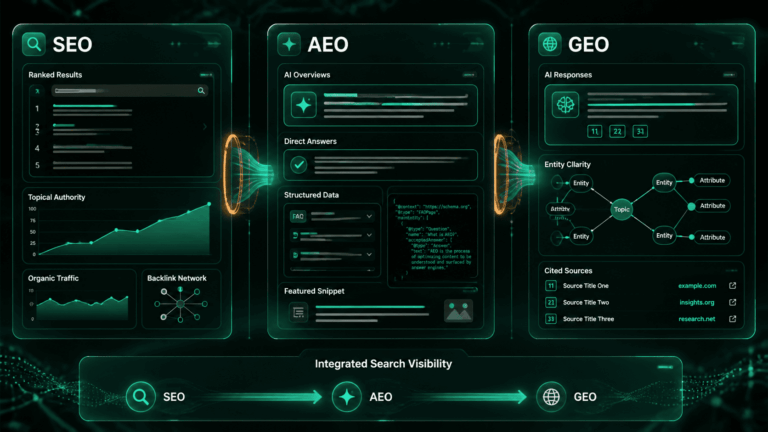

Quick answer: Google says there is nothing special to do to appear in AI Overviews. A page is eligible as a supporting link if it is indexed and eligible to be shown in Search with a snippet, with no extra technical requirements, no special schema, and no AI-specific files. In practice that means three jobs: confirm eligibility, cover the sub-questions around your topic, and measure with Search Console’s new AI performance report.
The honest answer to “how do I rank in Google AI Overviews” is less exciting than most guides make it sound. Google’s own documentation, AI features and your website, states that the best practices for SEO remain relevant, and that there are no additional requirements to appear in AI Overviews or AI Mode, nor other special optimizations necessary. That does not make the topic trivial. It moves the work from tricks to verification: making sure nothing on your site quietly disqualifies a page, and writing content that a system issuing many related searches can actually use.
This guide follows that logic. It starts with the eligibility checks that matter most, then covers content, measurement, the new opt-out control, and the myths Google’s documentation contradicts. If you are optimizing for ChatGPT as well, the mechanics differ, so read How to Rank in ChatGPT separately rather than treating the two as one project.
What Does Ranking in Google AI Overviews Actually Mean?
An AI Overview is not a ranked list. It is a generated summary that surfaces links to supporting pages. Google describes AI Overviews as designed to appear on queries where they add benefit beyond what people already get in Search, and says they are only shown when its systems determine they are additive, so they often don’t trigger at all. Whether you can appear therefore depends partly on whether the query produces an AI Overview in the first place.
Google also says both AI Overviews and AI Mode may use a “query fan-out” technique, issuing multiple related searches across subtopics and data sources to build a response, and that this lets them display a wider and more diverse set of links than a classic web search. That has a practical consequence worth stating carefully: because the system searches for sub-questions, a page can be a good supporting source for a sub-question even if it does not rank first for the main query. Google does not publish a ranking threshold for inclusion, so treat that as the logical implication of fan-out, not a documented rule.
Step 1: Is Your Page Indexed and Eligible for a Snippet?
This is the only technical requirement Google names. To be shown as a supporting link, a page must be indexed and eligible to be shown in Google Search with a snippet. Google also notes that meeting every requirement does not guarantee crawling, indexing, or serving. The second half of that requirement, snippet eligibility, is where sites tend to trip, because several directives suppress snippets and are easy to apply by accident.
| Control | What it does | Why it matters for AI Overviews |
|---|---|---|
noindex | Keeps the page out of Google’s index | A page that is not indexed is not eligible |
nosnippet | Prevents text snippets from the page | Eligibility requires a snippet, so this takes the page out of consideration and also strips normal snippets |
max-snippet:0 | Limits the snippet length to zero | Behaves like nosnippet for eligibility purposes |
data-nosnippet | Excludes specific HTML sections from snippets | Check you haven’t wrapped the answer paragraphs you want quoted |
These directives appear in three places: in a robots meta tag, in an X-Robots-Tag HTTP header, and as an HTML attribute on individual elements. Look for lines like these:
<meta name="robots" content="nosnippet">
<meta name="robots" content="max-snippet:0">
<meta name="robots" content="noindex">

# Same directives can arrive as an HTTP header:
X-Robots-Tag: nosnippet
The usual causes are not deliberate. A theme template, an SEO plugin setting applied to a post type, a leftover staging configuration, or a CDN rule can each add a directive across hundreds of pages. Google’s documentation recommends using the URL Inspection tool in Search Console to see the HTML Googlebot actually received, which is the reliable way to confirm what a page is sending. Google also lists allowing crawling in robots.txt, and in any CDN or hosting infrastructure, as a baseline.
For a fast first pass on a single URL, the AEO Readiness Checker flags noindex and canonical problems. It will not replace URL Inspection for snippet directives, so use both. For the wider technical picture, see Technical Foundations for AI-First SEO.
Step 2: Are You Doing the Fundamentals Google Lists?
Google’s AI features documentation gives a short list of SEO practices it says remain worthwhile. None of them is new, which is the point:
- Allow crawling in robots.txt and in any CDN or hosting infrastructure.
- Make content easy to find through internal links.
- Provide a good page experience.
- Make sure important content is available in text form, not only in images or scripts.
- Support text with high-quality images and videos where they help.
- Make sure structured data matches the visible text on the page.
- Keep Merchant Center and Business Profile information up to date, if they apply to you.
One line in that documentation deserves plain treatment, because this site publishes schema tools: Google says there is no special schema.org structured data you need to add, and no new machine-readable files, AI text files, or markup needed to appear in these features. Structured data is still worth getting right. It helps machines parse a page and powers rich results, and it must match what the page says. But it is not a documented lever for AI Overviews, and any guide that sells FAQ schema as the way in is claiming more than Google does.
Step 3: Do You Cover the Sub-Questions, Not Just the Headline Query?
If the system fans a query out into related searches, the content that serves it well answers the whole cluster of questions around a topic, each in a passage that stands on its own. For this article’s own topic, the sub-questions a reader or a fan-out system would ask are: what makes a page eligible, which directives disqualify it, how do I measure appearances, and should I opt out. Each of those has its own heading above, and each opens with the direct answer.
To apply this to your own pages, list the questions a buyer or reader would ask next, give each its own heading in question form, and lead each section with a one- or two-sentence answer before adding context. The Entity Gap Mapper helps you find concepts a strong page on your topic should cover that yours does not, and the Real Retrieval Simulator shows which of your paragraphs match realistic questions. It is a proxy for retrieval in general, not a simulation of Google’s system, so use it to find weak paragraphs rather than to predict a result. The underlying approach is covered in LLM Optimization: How to Make Content Model-Friendly.
Step 4: Do You Publish Something Google Has a Reason to Link To?
Google points to its guidance on creating helpful, reliable, people-first content as the key best practice. Translated into specifics you can act on: include information a reader cannot get by paraphrasing the top five results, name the author and their credentials, cite primary sources, and keep dates honest. Kevin Indig’s H1 2026 analysis for Search Engine Land makes the same point from the AI search side, arguing that content should lead with unique information, read directly, and cut filler. Generic summaries of other people’s pages are exactly what a summarizing system has the least reason to link to, because it can produce that summary itself.
Step 5: How Do You Measure Appearances in AI Overviews?
Measurement has improved recently. Google’s documentation says sites appearing in AI features are included in the overall search traffic in Search Console, reported in the Performance report under the Web search type. On top of that, Search Engine Land reported on August 31, 2026 that Google’s AI performance report is now available to all Search Console accounts worldwide. The report covers performance in AI responses, AI Mode, and AI Overviews, with impressions, pages, countries, devices, and dates, but no click data.
Two cautions apply. First, the lack of click data means you can see where you appear but not what it earned, so pair the report with landing-page analytics. Google says clicks from results pages with AI Overviews tend to be higher quality, meaning users are more likely to spend time on the site. That is Google’s observation, not an independent finding, so test it against your own data. Second, the layout keeps moving. Search Engine Land reported on October 15, 2026 that Google updated AI Mode and AI Overviews with more links, context, carousels, and information on creators, which is a reason to recheck your target queries periodically instead of assuming last quarter’s picture still holds. For a broader measurement framework, see KPIs for AI-Native SEO and GEO.
Should You Opt Out of Google’s AI Features?
You now have more control than before, and the trade-offs are specific. Google says robots.txt directives for Googlebot are the control for how your site is crawled for Search, and that to limit what is shown from your pages you can use nosnippet, data-nosnippet, max-snippet, or noindex. Those snippet controls also affect how your page appears in ordinary results, so they are a blunt instrument.
The newer option is a Search Console control for generative AI features. According to the Search Engine Land report, Google says sites that opt out will not receive traffic or impressions from its generative AI features, and that the control is not used as a ranking signal for results outside those features. Whether to use it is a business decision. If your content is your product, for example licensed or paywalled material, limiting reuse may be worth the lost exposure. If your goal is discovery, opting out removes you from a surface that can send higher-intent visitors. Decide per section of the site rather than for everything at once.
Which AI Overviews Myths Does Google’s Documentation Contradict?
| Common claim | What Google’s documentation says |
|---|---|
| You need special schema markup | There is no special schema.org structured data you need to add |
| You need an llms.txt file | You don’t need to create new machine-readable files, AI text files, or markup to appear |
| Blocking Google-Extended removes you | Googlebot’s robots.txt rules control crawling for Search. Google-Extended relates to limiting AI training and grounding in some of Google’s other systems |
| You must rank first | The stated requirements are being indexed and snippet-eligible. No rank threshold is documented, and query fan-out surfaces a wider set of links |
| Meeting the requirements guarantees inclusion | Meeting requirements doesn’t mean Google will crawl, index, or serve a page. Indexing and serving aren’t guaranteed |
Stay Ahead of AI Search.
Weekly AEO, GEO & AI SEO intelligence for marketers who want their content cited by AI. No fluff.
Frequently Asked Questions
The Bottom Line
There is no secret tactic for Google AI Overviews, and Google says so in its own documentation. What there is: a short eligibility checklist that catches real problems, content that answers the sub-questions a fan-out system asks, and, as of this year, a Search Console report that finally shows where you appear. The most valuable hour you can spend is the first one, confirming that no template, plugin, or CDN rule is quietly stripping snippets from your best pages.
Start by running a key page through the free AEO Readiness Checker, confirm the page’s snippet directives with Search Console’s URL Inspection tool, then open the AI performance report and see which of your pages already appear.

Written by
AEO Insider Editorial Team
We help modern marketers and operators get their content cited by AI, discovered in search, and wired into scalable growth systems. Our collective focus is entirely on the cutting edge of AEO, GEO, and AI-native SEO.
ABOUT AEO Insider →